SSH Session Freeze, MTU and MSS Clamping


After deploying GREtap tunnels to extend my VLANs across my OpenWRT WiFi mesh, I encountered a frustrating issue: my SSH sessions would randomly freeze and require a complete restart. The cause? A classic MTU and fragmentation problem. Here's how MSS clamping solved the issue.
The Symptom: Freezing SSH Sessions
The problem was particularly annoying during remote administration:
- SSH sessions would work normally for a few minutes
- Then suddenly, the session would freeze completely
- No response, no error, just a frozen terminal
- Unable to type anything, even Ctrl+C wouldn't work
- Only solution: close the terminal and open a new connection

SSH sessions would freeze without any error message.
This behavior was intermittent but systematic: all sessions would eventually freeze after some time of use.
Understanding MTU and Its Impact
What is MTU?
MTU (Maximum Transmission Unit) represents the maximum size of a network packet that can be transmitted without fragmentation. On standard Ethernet, the default MTU is 1500 bytes.
The Problem with Tunnels
Tunneling protocols like GREtap add additional headers to each packet:
- GRE header: 4 bytes (tunnel protocol)
- Outer IP header: 20 bytes (for tunnel routing)
- Inner Ethernet header: 14 bytes (for transported traffic)
Total GREtap overhead: approximately 38 bytes
This means for a 1500-byte packet to transmit:
- Actual size after encapsulation: 1538 bytes
- Ethernet MTU exceeded by: 38 bytes
WiFi Mesh Aggravates the Problem
On a WiFi mesh backhaul, the problem is even more pronounced:
- WiFi mesh adds its own headers
- WiFi fragmentation is less efficient than wired Ethernet
- Oversized packets can be silently dropped
- Result: connections that freeze without error messages
The Diagnosis: MTU Problem Confirmed
Using ping with the Don't Fragment (DF) option, we can test the maximum accepted packet size.
On the GREtap interface configured with a default MTU of 1280 bytes:
# Test with a 1253-byte packet
ping -M do -s 1253 192.168.100.2
# Result: FAILED (100% packet loss, "message too long, mtu=1280")

# Test with a 1252-byte packet
ping -M do -s 1252 192.168.100.2
# Result: SUCCESS (0% packet loss)
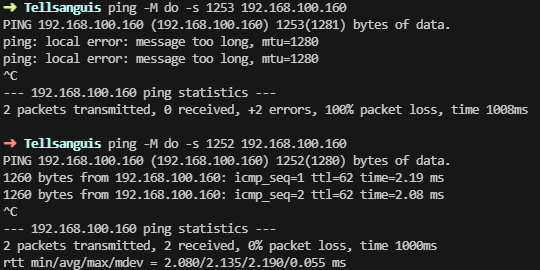
Ping tests showing failure at 1253 bytes and success at 1252 bytes with MTU 1280.
The test reveals that the default MTU of 1280 bytes is too restrictive. Slightly larger packets are fragmented or dropped, causing the SSH freezes.
The Solution: MSS Clamping
What is MSS Clamping?
MSS (Maximum Segment Size) is the maximum size of TCP data in a segment. MSS clamping is a technique that modifies TCP SYN packets (connection establishment) to announce a smaller MSS.
This forces both ends of the connection to:
- Negotiate a smaller TCP segment size
- Avoid fragmentation upstream
- Create packets that pass through the tunnel without issues
Configuration in OpenWRT
MSS clamping configuration is done in OpenWRT's advanced firewall settings:
- Navigate to Network → Firewall
- Open the Advanced Settings tab
- Enable MSS clamping for the relevant zones
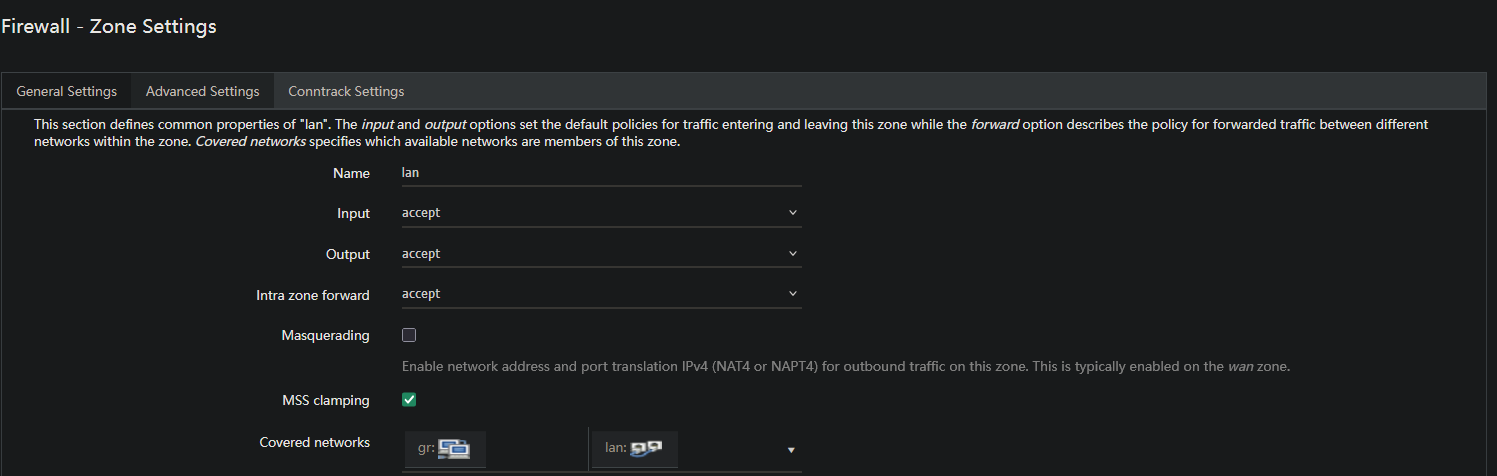
Option explanation:
- MSS clamping: Enables automatic MSS recalculation based on interface MTU
- OpenWRT will automatically calculate:
MSS = MTU - 40(TCP/IP headers)
Validation Tests
After enabling MSS clamping and adjusting the MTU, I performed tests to confirm the problem is resolved.
Tests with hping3 and tcpdump
To validate that MSS clamping is working correctly, I used hping3 to send TCP SYN packets and tcpdump to capture and verify that the MSS is being modified:
# Send TCP SYN packets with hping3
hping3 -S -p 80 192.168.100.2

# Capture with tcpdump to verify MSS clamping
tcpdump -i gretap-gr -nn 'tcp[tcpflags] & tcp-syn != 0'

Tcpdump capture showing MSS clamping in action: packets with MSS 1500 are automatically modified to use MSS 1240.
Tests confirm that MSS clamping is working correctly and that SSH sessions no longer freeze, even with large data transfers.
Manual MTU Configuration
Additionally to MSS clamping, I also manually adjusted the MTU on the GREtap interface:
On both routers:
- Network → Interfaces → [GREtap Interface]
- Advanced Settings:
- Override MTU:
1450or1400
- Override MTU:
Why not use the theoretical optimal MTU of 1462?
- WiFi mesh MTU: 1500 bytes
- GREtap overhead: 38 bytes
- Theoretical optimal MTU: 1500 - 38 = 1462 bytes
However, I chose an MTU of 1450 or 1400 to have a safety margin, especially to ensure WiFi mesh stability which can add variable additional headers.
Understanding MSS Clamping in Detail
MSS clamping works by modifying TCP SYN packets during connection establishment:
- Client sends SYN with MSS=1460 (default Ethernet value)
- Router with MSS clamping intercepts the packet
- Router recalculates: Optimal MSS = Interface MTU - 40 = 1462 - 40 = 1422
- Router modifies the SYN packet to announce MSS=1422
- Server responds with MSS=1422 or less
- Result: the entire TCP connection will use segments of maximum 1422 bytes
With an MSS of 1422 bytes:
- TCP segment size: 1422 bytes
-
- TCP header: 20 bytes
-
- IP header: 20 bytes
- = Total IP packet: 1462 bytes
This 1462-byte packet:
- Enters the GREtap tunnel
-
- GREtap overhead: 38 bytes
- = Final packet: 1500 bytes
The final 1500-byte packet fits perfectly within the 1500-byte Ethernet MTU. No fragmentation needed.
Conclusion
MSS clamping is an elegant solution to resolve MTU issues on tunnels:
- Transparent: works automatically without client configuration
- Effective: completely avoids fragmentation
- Performant: no negative performance impact
- Standard: supported by all modern routers and firewalls
If you deploy GREtap tunnels (or any other tunnel type) on your network infrastructure, remember to:
- Calculate the optimal MTU by subtracting the protocol overhead
- Manually configure the MTU on tunnel interfaces
- Enable MSS clamping in your firewall
For more details on the complete configuration of GREtap tunnels with OpenWRT, see the full article: GREtap Tunnels for VLANs.
SSH sessions are now stable, even under load. No more freezes. Mission accomplished.